The free level is already running

Audit and daily oversight of your online store's Google Ads

AgencyOS 24/7 reads your Google Ads, finds where the ads lose money and explains the cause in plain language. It changes nothing without your approval.

Free · No card · No changes without your approval

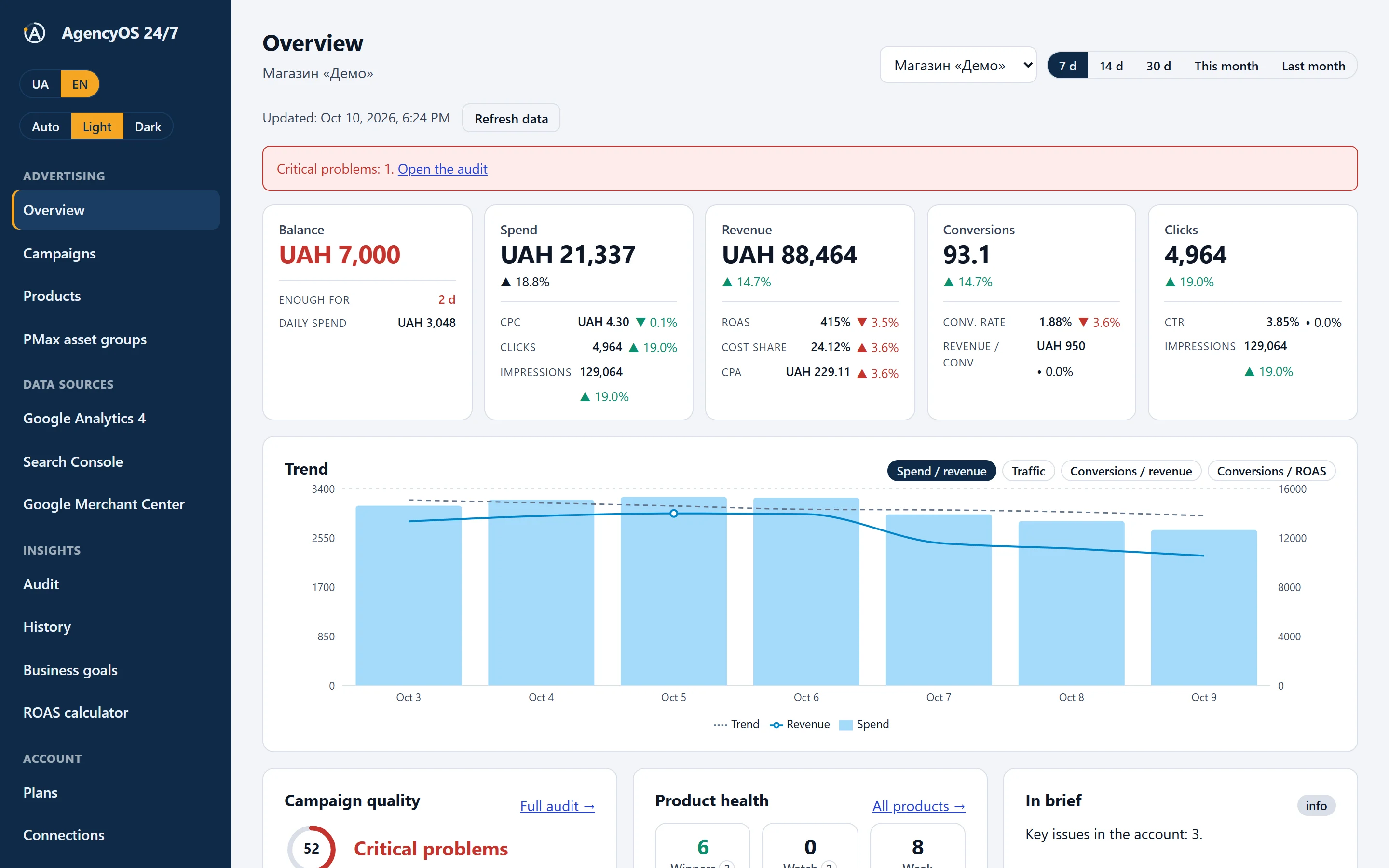
The Overview screen: spend, revenue, ROAS, trend and campaign quality blocks (demo data)

Data sources

  • Google Ads Available now
  • Merchant Center Available now
  • GA4 Available now
  • Search Console Available now

See how it works

A one-minute video: what the service reads from your Google Ads, what it shows, and what it warns about every day.

Your Store's Google Ads Under Daily Watch

What you see in the dashboard

These are not mock-ups. The screenshots come from the live app on a demo account: every name and number is test data.

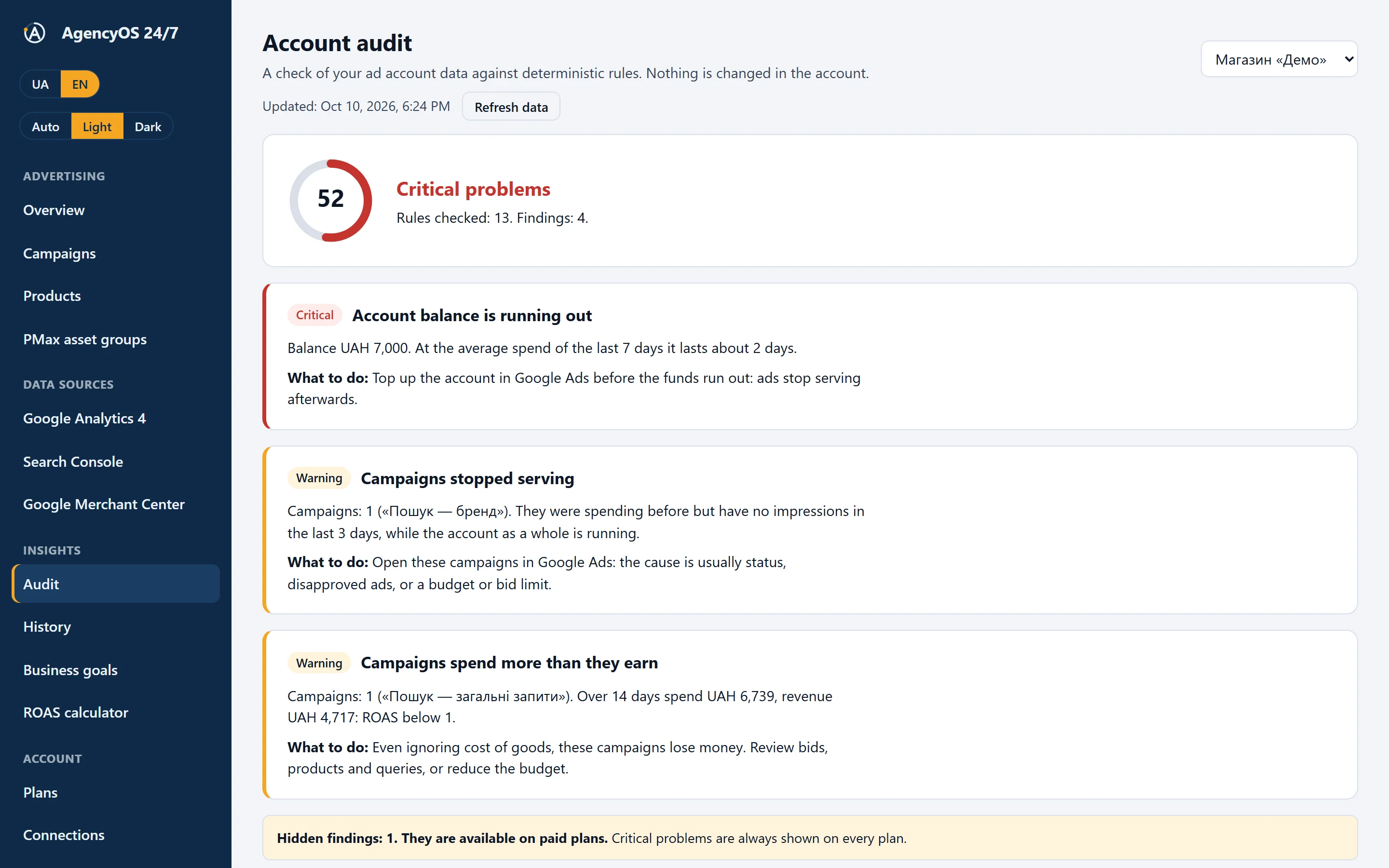
Audit Available now

An account score and specific findings

35 rules check the balance, campaigns that stopped serving, spend that does not pay back and lost conversions. Every finding comes with numbers and what to do next.

  • A score from 0 to 100 and a level: good, needs attention, critical
  • On paid plans, critical problems are sent to Telegram
  • All rules and thresholds are public on the Methodology page

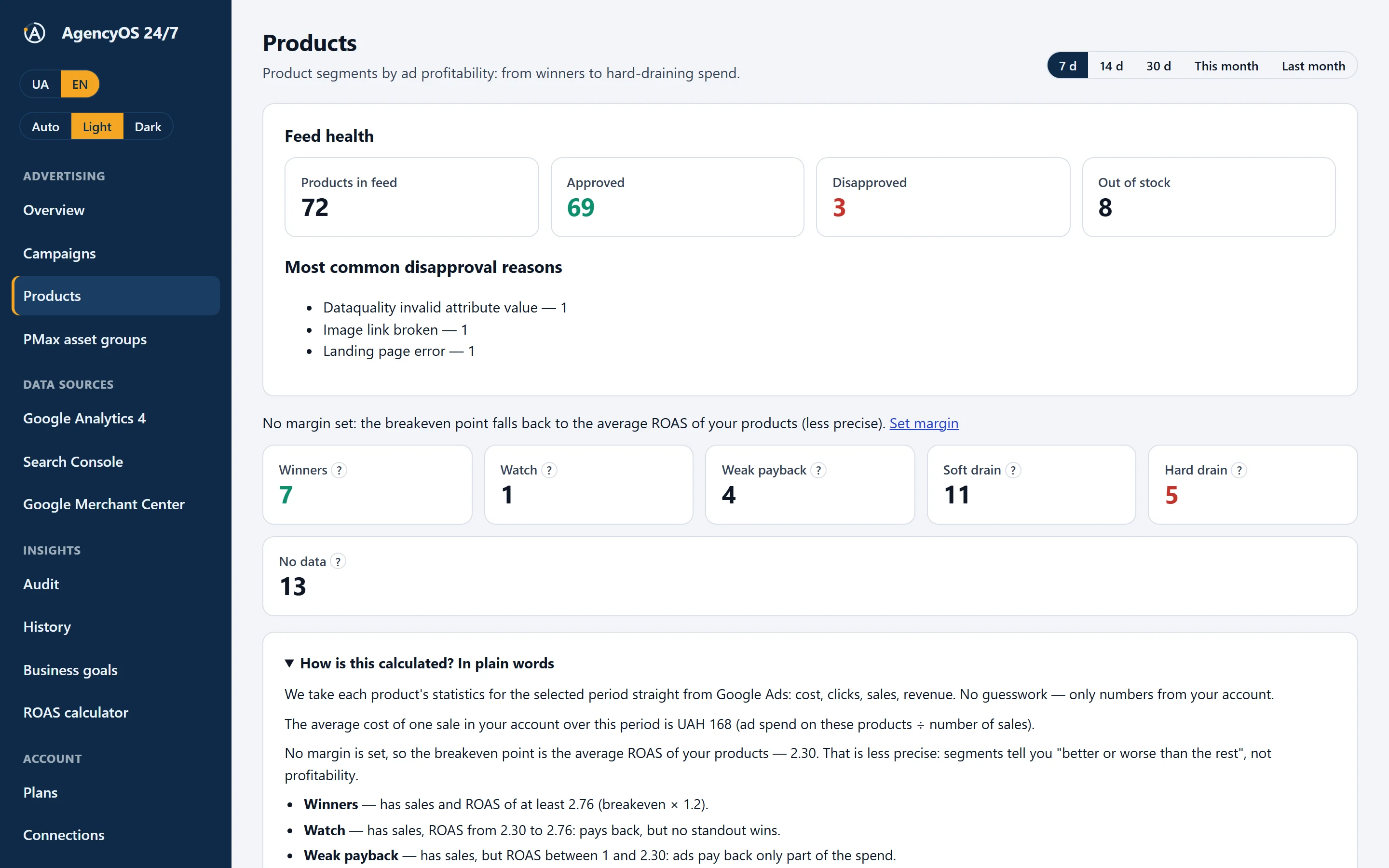
Products Available now

Where the money really goes, product by product

Products are grouped by return: winners, watch, weak return, soft and hard drain, not enough data. Next to it is an explanation of how each segment is calculated.

  • Top winners and top risky products
  • A break-even point based on your margin
  • A separate segment for products that ads do not show

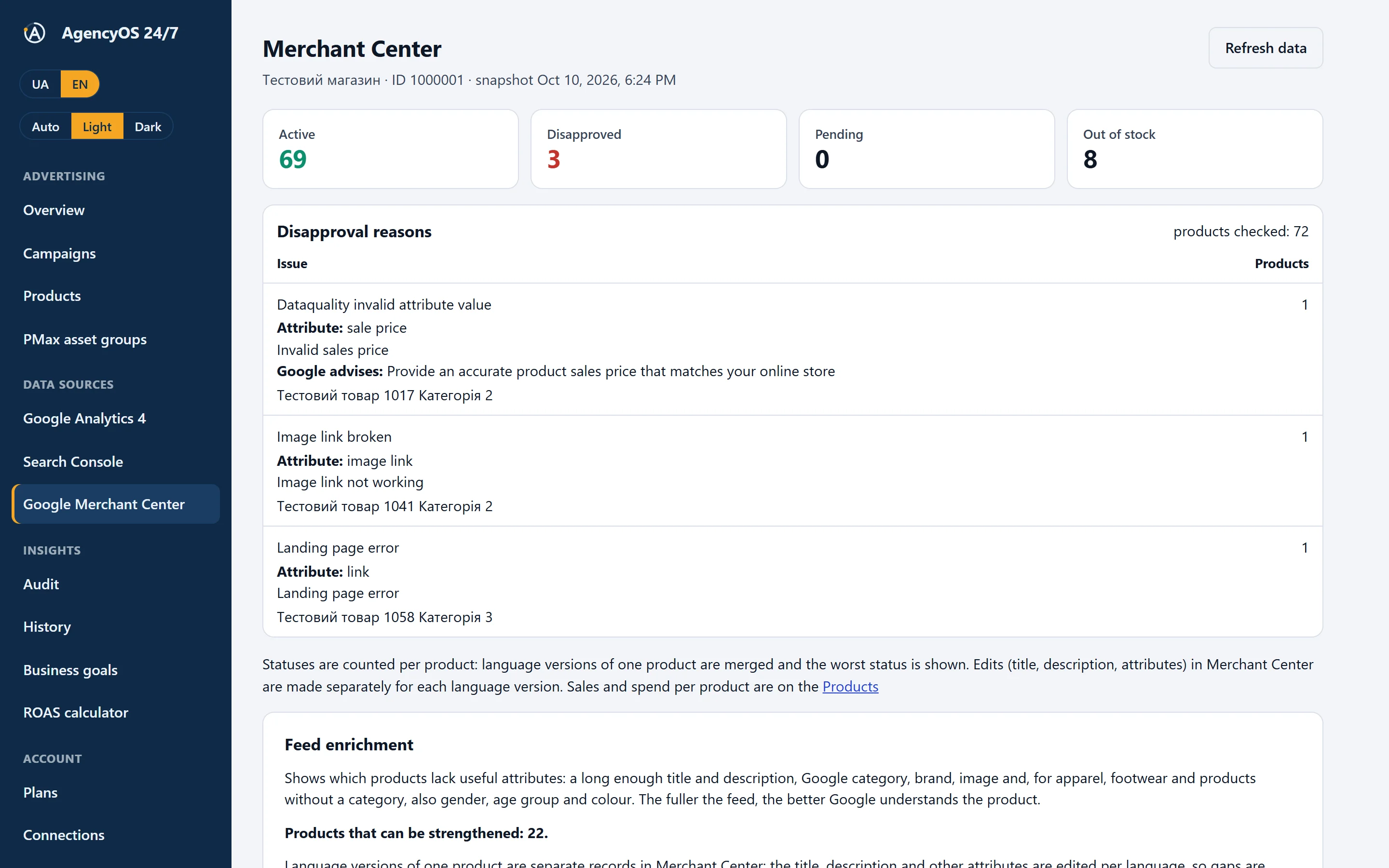
Merchant Center Available now

Product disapproval reasons, in plain language

For every reason: which feed attribute, what is wrong and what Google recommends. Language versions of one product are merged and the worst status is shown.

  • About 40 disapproval codes translated
  • Feed enrichment: what products lack, by language
  • Refresh data on demand, without waiting for the night

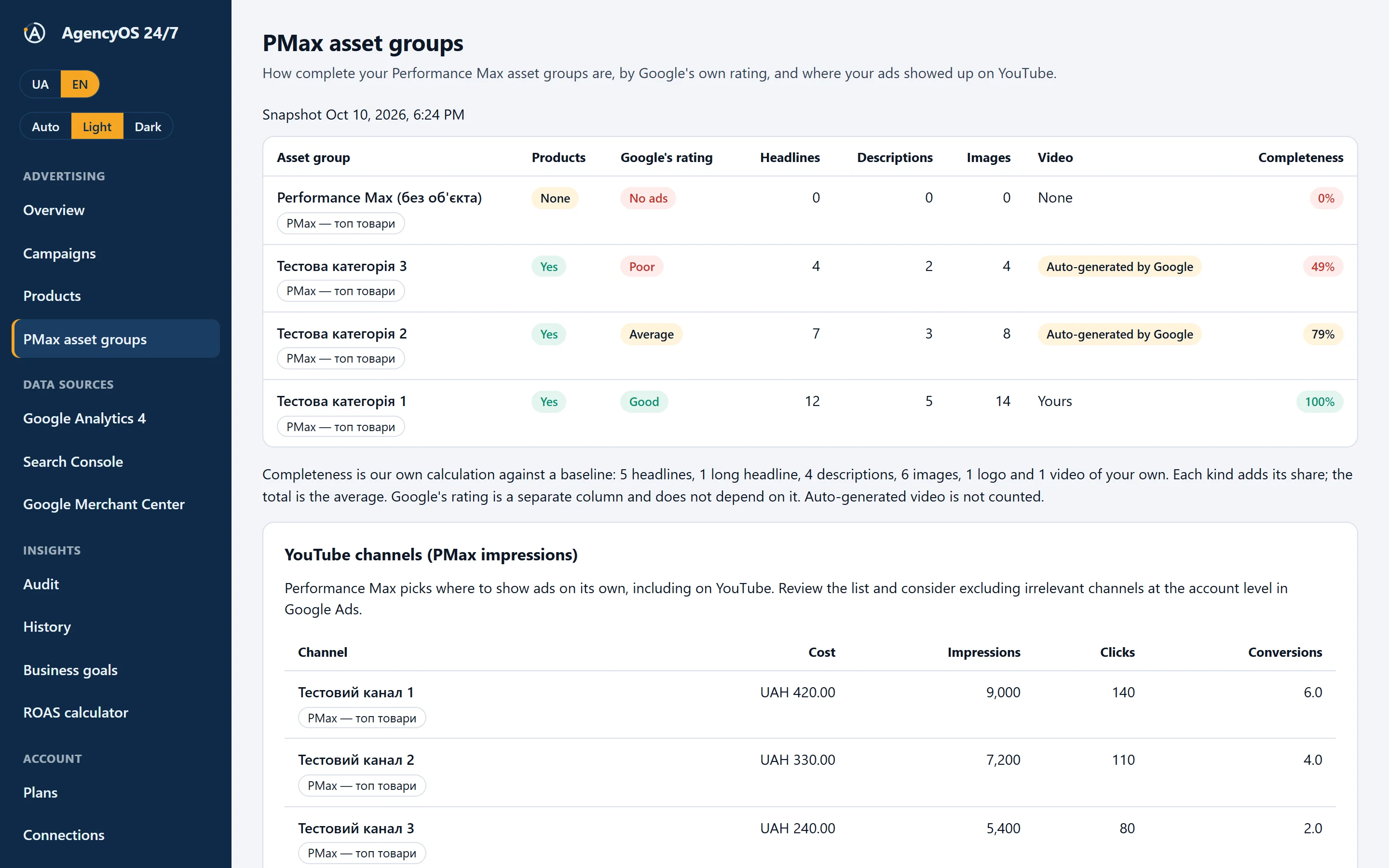
PMax asset groups Available now

Performance Max: how complete the asset groups are

Empty groups, a shortage of headlines, descriptions and images, a missing own video, products in the group and the YouTube channels where your ads ran.

  • Completeness in percent is our own calculation, separate from Google's rating
  • YouTube impressions by channel: spend, clicks, conversions

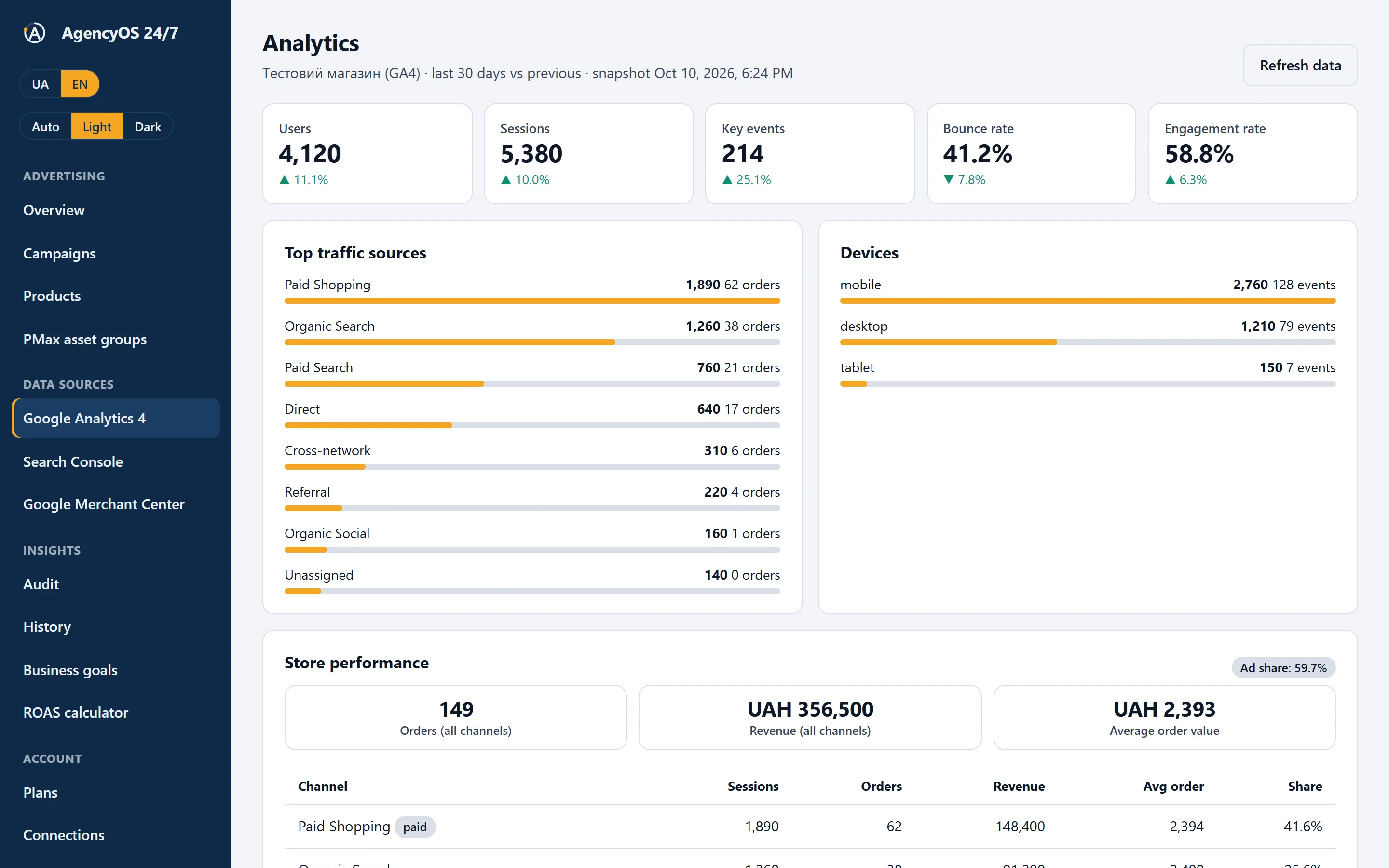
Analytics (GA4) Available now

What happens on the site after the click

Users, sessions, key events, bounce rate, engagement, traffic sources and devices. The store performance block compares orders and revenue by channel.

  • Share of ads in the store's revenue
  • Last 30 days against the previous 30

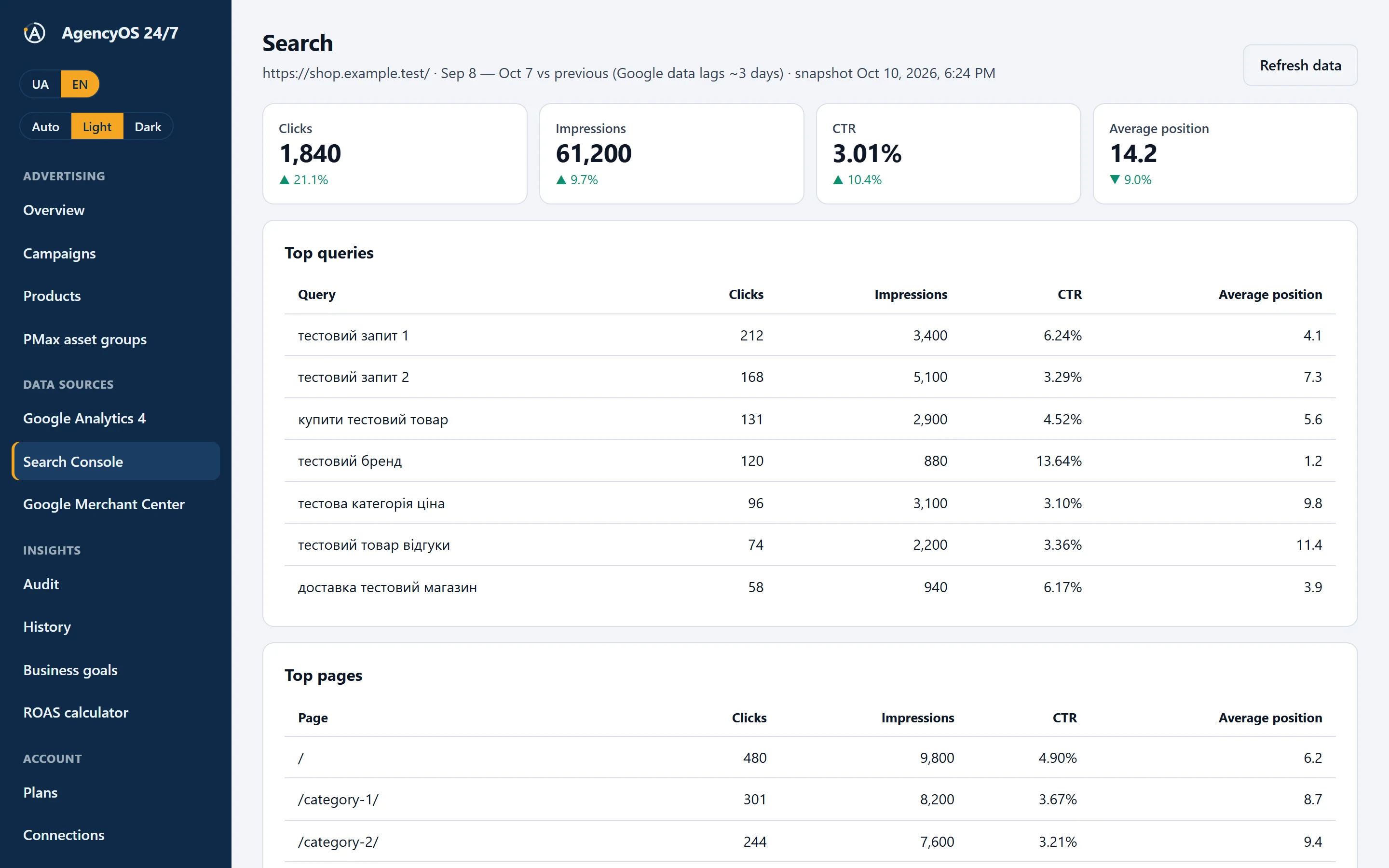
Search (Search Console) Available now

The queries people find you by

Clicks, impressions, CTR and average position, top queries and pages. You see what organic search brings next to ads.

  • Google's data arrives about three days late, and we mark that
Google Ads Audit for Online Stores: 35 Checks in One Minute
Product Labels for Google Ads: Payback Segments from Merchant
Negative Keywords, Duplicate Conversions and Account Changes
Google Ads Budget Forecast and Excel Reports

What the deep audit checks

35 checks across six areas. Every finding shows its source, period and the section where you can verify it. The service changes nothing in the account.

  • Search terms and intent Available now

    Queries without conversions, irrelevant intent (“free”, “what is”, jobs), brand queries in non-brand campaigns and campaigns without negative keywords. The negative list can be downloaded as a spreadsheet.

  • Budgets and strategies Available now

    A budget below three target CPAs, a shared budget across campaigns with different goals, click bidding instead of sales, an overly high ROAS target, too little data for smart bidding.

  • Conversion tracking Available now

    Duplicate purchase conversions, non-purchases among primary actions, a silent purchase action, missing conversion value and gaps with GA4.

  • Product feed Available now

    Disapproved products, attribute gaps, products without impressions, lost visibility and Google policy trigger phrases in titles.

  • Performance Max Available now

    Weak asset groups, missing search themes, spend concentrated on a few products.

  • Change history Available now

    Who changed what in Google Ads over 30 days and what happened to the campaign's conversions after the edit.

AI Assistant and Deep Audit for Google Ads

Feed improvement: fuller titles and structure without CMS edits

AI suggests better titles, descriptions, Google categories and attributes, and you review and approve them. Approved values are served as an XML link that you connect once in Merchant Center as a supplemental feed: the primary feed and your CMS stay untouched, and the service writes nothing to Merchant itself.

Monthly volume: up to 200 products on Start, up to 1,000 on Growth, up to 100,000 on Pro.

  • Refine the title

    Product type, brand, key feature and variant are put in a controlled order; the brand, numbers and part numbers stay as they were.

  • Fill in the Google category

    AI walks the product down the Google taxonomy level by level and picks a real category from the reference, not an invented one.

  • Add attributes

    Material, size, volume and similar are written out only from what is already in the title or description.

  • Split the assortment

    Labels (custom label) by ad result, price, brand, category or availability: Google Ads campaigns are split by them.

  • Check what changed

    “Was” and “now” side by side. Suggestions with promotional words or a lost brand are not approved in bulk. A “was → now” Excel report is available.

See a feed check example

Merchant Center Feed Improvement: AI Prepares, You Approve
Product Feed Check by Link: a 0–100 Data Score

Weekly snapshot

Every Monday the service collects the week's summary: spend, revenue and ROAS against the previous 7 days, the audit score and what appeared or disappeared in the findings. Free for one account; on paid plans with Telegram the summary arrives as a message.

Open the ROAS calculator

Weekly Google Ads Snapshot and a ROAS Calculator
ROAS Calculator: How Much to Sell and What Budget to Set

Questions for your data

The AI assistant answers questions about your account, and the numbers are still calculated by the service using rules, not by the model. Below is an example answer on demo data.

Example on demo data
Why has revenue dropped since October 7 although spend is the same?

Spend holds at about UAH 3,000 a day, while revenue since October 7 has fallen from roughly UAH 14,000 to UAH 11,000. The conversion rate fell by 3.6% over the same period.

In the product view, 5 items spend budget without a single sale (hard drain), and the “Shopping — whole catalog” campaign is limited by budget, so those products take impressions away from the winners.

Data verifiedGoogle Ads · campaigns, 7 daysGoogle Ads · products, 7 days
What to doExclude the 5 “hard drain” products from the Shopping campaign for 14 days. You do this in Google Ads itself: the service changes nothing in the account on its own.

An example on demo data. The assistant answers from your own account data; the number of requests depends on your plan.

What it gives an online store

  • Plain language

    Product disapproval reasons and audit findings are explained simply, with the attribute and Google's advice.

  • Critical alerts in Telegram

    On paid plans: balance running out, impressions stopped, conversions gone — the message arrives at once, not when you open a report.

  • Segments by return

    You see the winners and the products that drain the budget. The thresholds are public and you can set the break-even point from your own margin.

  • A free ROAS calculator

    How much a conversion can cost for ads to stay profitable, taking your markup into account.

  • Findings history

    A log of critical events: what happened, when and whether it passed. Free for 30 days.

  • Read-only

    The service has no right to change your campaigns. Whatever it recommends, you do yourself or approve separately.

How it works

  1. Connect

    Sign in with Google or e-mail and choose your Google Ads account. Access is read-only.

  2. Wait for the first snapshot

    The service loads campaigns, statistics and balance and checks them against the rules at once.

  3. Read the conclusions

    A score, findings, products by return. Every item has a cause and what to do.

  4. You decide

    You fix things in Google Ads yourself or with your contractor. The service watches that the problem does not return.

Methodology and a sample

We do not ask you to take our word for it. The rules are public, and you can read a sample report before signing up.

Methodology

What exactly we read, how the score and segments are calculated, where the limits lie.

Read the methodology

Sample audit

A full report on synthetic data of an imaginary store: findings, products, PMax groups, Merchant.

View the sample

Pricing

Start for free. Paid plans open together with payments; items the service does not have yet are marked “soon” on the pricing page.

Free

$0

1 Google Ads account, a score, all critical problems and an AI chat (5 requests a month)

Start for free

Growth

$180 /month

Up to 3 accounts, 12 months of change history

Choose

Pro

$380 /month

Up to 20 accounts and brands, unlimited history

Choose

No plan changes your ad account without your approval.

All terms and plan contents →
Pro Plan: Public Report Links and Many Google Ads Accounts

All videos on YouTube →

Security and data

  • We change accounts only after your approval; in the current version the service is read-only.
  • We do not sell your data, use it for advertising or train models on it.
  • You can disconnect a source or delete your account at any time — access is revoked at Google.
  • Data is stored on servers in Germany (EU).

Google has reviewed access to Google Ads

The app passed Google's OAuth review for access to Google Ads in October 2026. This is not a Google certification or partnership. Access to Merchant Center and GA4 is going through a separate Google review: until it finishes, the Google consent screen may show an “unverified app” warning. Search Console needs no separate review.

How we handle data →

Questions people ask first

What is this service?

Daily oversight of an online store's ads: it reads Google Ads (and Merchant Center, GA4 and Search Console), checks the account against public rules, shows products by return and explains problems in plain language.

Does the service change my ad account?

No. Right now the service only reads data. You make all changes in the account yourself: the service only shows what to fix and where.

What data do you read?

Campaigns, their statuses and budgets, daily statistics, the account balance, Performance Max asset groups and product statistics. We do not ask for access to Gmail, Drive or Photos. Details are in the Privacy Policy.

Do you see Google's payment data?

No. We do not see card numbers or payment details. We read campaign statistics, their settings and the account balance.

Is there an AI assistant?

Yes. The AI assistant answers questions about your account in Ukrainian or English. The service calculates the numbers by open rules and the model only explains them in plain language. To answer, we send the model minimised data: no access tokens, e-mail or identifiers of your Google accounts. Under the terms of the providers' paid APIs, this data is not used to train their models. The number of requests depends on your plan; the free plan has 5 per month.

What does a Google Ads audit check?

35 rules: lost access, stale data, a low account balance, stopped spend, lost and falling conversions, missing conversion tracking, campaigns without impressions, a sudden spend spike, campaigns below break-even, missing conversion value, campaigns limited by budget, and no active campaigns. Another 22 deep-audit rules cover search terms and negative keywords, budgets and strategies, duplicate conversions and gaps with GA4, the product feed and Google policy trigger phrases, Performance Max asset groups and the change history with the effect of edits. Each rule has a threshold and an explanation on the Methodology page.

Does it work for Performance Max and Google Shopping?

Yes. The service shows the return of each product (winners, watch list, weak return, waste), checks the completeness of Performance Max asset groups, and once Merchant Center is connected it shows product statuses and feed problems.

I already have an agency. Why do I need this?

It does not replace your contractor; it is your independent daily view of the same numbers. It helps you ask precise questions and spot problems before the report does.

How long does connecting take and do I need a card?

No card is needed. Connecting means signing in with Google or e-mail and choosing a Google Ads account, a few clicks. The first data snapshot appears once statistics are loaded.

How do I disconnect a source or delete my data?

In the dashboard at any time: we revoke the access token at Google and delete the data. You can also send a request by e-mail.

How much does it cost?

The free level is already running. Paid plans and what they include are on the Pricing page.
What you will see after connecting

Account score

A number from 0 to 100 and a level: where all is well and where attention is needed.

Critical problems

Everything that threatens money right now: balance, stopped impressions, lost conversions.

The first step

What to fix first and where to look for the cause, with numbers for the last days.

Free · No card · No changes without your approval

app.agencyos24.com